 Bye
ByeDPI — Bypass DPI,
right on your own device
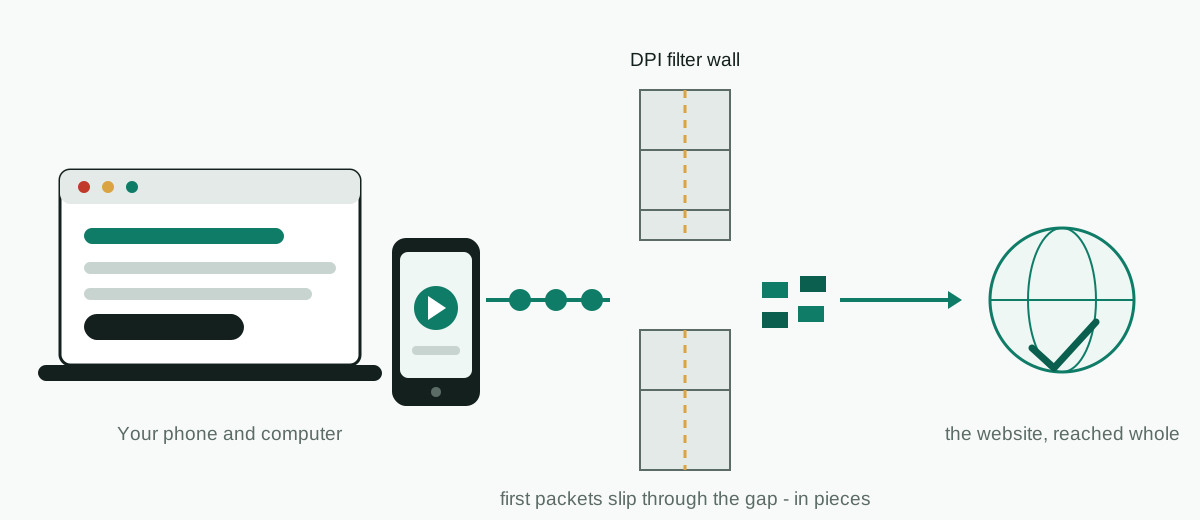
ByeDPI is a free, open-source local SOCKS proxy that implements Deep Packet Inspection bypass methods, so sites blocked or throttled by your provider can open again — without sending your traffic to anyone else's server.
Always download from the official GitHub sources linked on this site — never from random APK or re-upload sites.
What is ByeDPI?
What it is, what it is not, and why people install it.
- A local SOCKS proxy server that implements several DPI bypass (desync) methods. The core program is called
ciadpiand is developed by hufrea on GitHub. - A desync tool, not a VPN. It changes how the first packets of a connection are sent — splitting them, sending them out of order, or sending a fake packet first — so a DPI filter cannot read the site name (SNI / Host) it normally blocks on.
- The engine inside the Android app. ByeDPI for Android wraps the same core in an app that uses Android's VPN mode only to route traffic through the local proxy on your phone.
What DPI does
DPI (Deep Packet Inspection) analyses and filters traffic. Providers and government agencies use it to block sites and services. Read the full explainer.
What ByeDPI does
It breaks the ClientHello into pieces a filter can't reassemble — while the server, which follows TCP properly, puts it back together and answers as if nothing happened.
What it does not do
It doesn't encrypt traffic, hide your IP address, or send anything to a remote server. ciadpi processes everything on the device in front of you.
How ByeDPI works, in four steps
From opening a blocked site to it loading as normal.
Your app connects to the local proxy
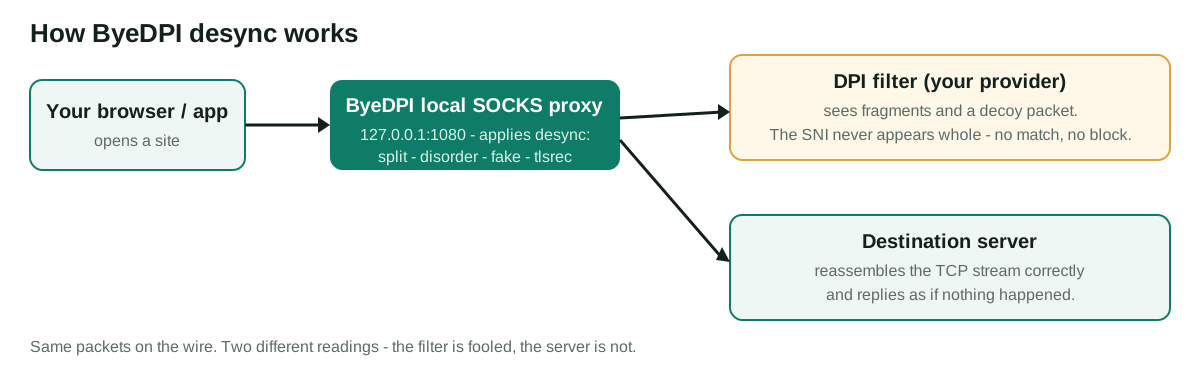
Your browser or phone sends traffic to ByeDPI on the same device — by default a SOCKS5 proxy on 127.0.0.1:1080.
ByeDPI desyncs the first packets
It applies a method you choose — for example --split, --disorder or --fake.
The DPI filter misreads the request
The filter sees fragments, an out-of-order piece, or a fake packet that never reaches the server — so it cannot reliably match the blocked domain.
The server answers normally
TCP reassembles the genuine request at the server, fragments and all. It replies as usual, and the site loads at full speed — no middleman, no detour, no extra hop.
Features
Small, single-purpose, and built to stay out of the way.
100% local
ciadpi runs on the machine in front of you and listens on 127.0.0.1. No remote server, no account, no sign-up — and no subscription quietly renewing next month.
Not a VPN
No tunnel, no far-away endpoint. Traffic goes straight to the site, so unblocked sites load exactly as fast as before — run a speed test and watch nothing change.
Many desync methods
Split, disorder, fake packets, OOB and TLS record splitting — methods can be combined in one command.
Auto mode
With --auto, bypass methods switch on only for connections that actually look blocked.
Target only what is blocked
Limit ByeDPI by domain list (--hosts), IP set, port or protocol, so the rest of your traffic is untouched.
Android without root
The Android app needs no root and can also run in proxy-only mode, for example alongside AdGuard.
Lightweight
The core is a single small program written in C. It sips battery and memory, because all it ever touches is the start of each connection — the rest streams past untouched.
Open source
The core is MIT-licensed and the Android app is GPL-3.0. Anyone can read the code on GitHub.
Popular guides
Start with the guide that matches your situation.
What is DPI?
How deep packet inspection blocks sites, and why desync works against it.
Best ByeDPI settings
Documented starting points for Linux, Windows and Android, and how to test them.
ByeDPI not working?
A step-by-step troubleshooting checklist when a site is still blocked.
ByeDPI vs GoodbyeDPI vs ByeByeDPI
Three similar names, three different projects. Which one you actually need.
ByeDPI with AdGuard
Run both on Android at the same time, using proxy mode.
SOCKS proxy setup
Point a browser or a whole system at ByeDPI on 127.0.0.1:1080.
ByeDPI's methods, in depth
Five methods do the actual work. They sound like variations on a theme — they aren't. Each one attacks a different assumption the filter makes, and that is why one works on your provider while another, recommended everywhere, does nothing at all.
Split cuts the first request into pieces. Take a filter that resets the connection the instant it spots a blocked name in the ClientHello: it never gets its moment, because the name arrives in two packets, neither of them containing it whole. The server reassembles them without blinking. Servers always could. Some filters, it turns out, can't — or won't spend the effort.
Disorder sends those pieces out of order. Piece two leaves first, piece one follows.
Fake is the blunt one. ByeDPI sends a decoy first packet — crafted so the filter inspects it, believes it, and the real server discards it because its TTL expires on the way or its checksum is deliberately wrong. The genuine packet slips through in the confusion. It fails loudly when a filter is smarter than the decoy, which is why we rank it third on the ladder, not first.
OOB and disoob hide a byte or two out of band, in a part of the TCP stream most filters simply skip. TLS record splitting cuts the ClientHello at the record layer instead, right through the SNI — the exact field the filter is reading. And auto mode wraps the lot: it watches for the tell-tale signs of a block (a reset straight after the ClientHello, a timeout where a reply should be) and only then applies the tricks, leaving normal connections completely alone. That restraint matters. A tool that mangles every connection will break something you care about, usually a bank.
Want the packet-level detail? Our how ByeDPI works guide walks through a real 30-byte request, piece by piece. Prefer to skip the theory? The best settings ladder turns all of this into an order to try things in.
ByeDPI vs a VPN vs a normal proxy: the honest version
People keep asking which one is "better". Wrong question. They solve different problems, and picking the wrong tool wastes more evenings than any blocked website.
| Question | ByeDPI | VPN | Normal proxy |
|---|---|---|---|
| Where does your traffic go? | Straight to the site. Nothing in the middle. | Through the VPN company's server, in another place entirely. | Through the proxy server you (or someone else) picked. |
| Does it hide your IP address? | No. Never claimed to. | Yes — sites see the VPN's address. | Sites see the proxy's address. |
| Does it encrypt anything? | No. HTTPS stays HTTPS; it adds nothing. | Yes, between you and the VPN server. | Usually no. |
| Beats a DPI filter? | That's its whole job. | Usually, until the network starts blocking VPNs too. | Not by itself. |
| Cost and speed | Free, and your connection keeps its normal speed. | Good ones charge monthly, and every packet takes the long way round. | Varies. Free ones are a gamble we wouldn't take. |
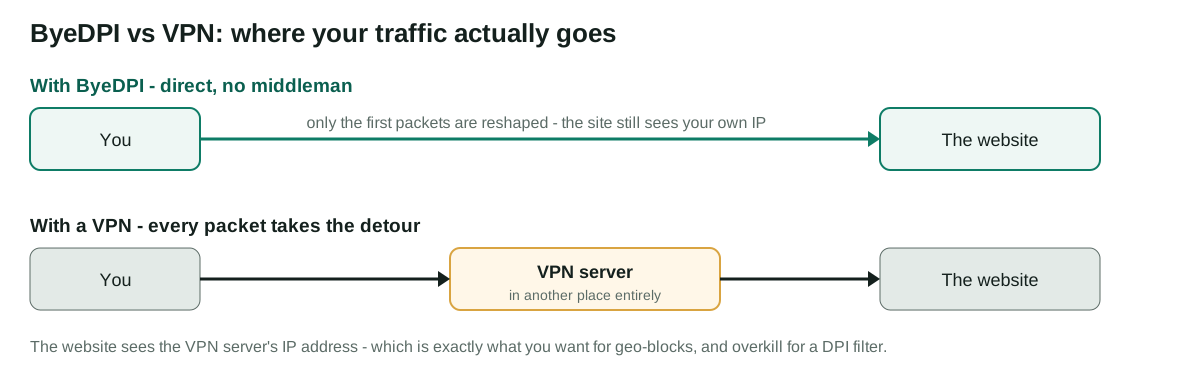
Our view, after checking all three against the same blocked sites: if a filter is your only problem, ByeDPI is the lighter fix — no subscription, no detour, no trusting a company with your traffic. If a site blocks your country outright, ByeDPI won't save you and we say so in the full ByeDPI review. That's VPN territory. The comparison with GoodbyeDPI and ByeByeDPI covers the other confusion — three tools, one name family, constant mix-ups.
Who ByeDPI is for — and who should walk away
You'll get on with it if…
- Specific sites or apps won't open on your network, while everything else works fine.
- You've seen the pattern: a page starts loading, stalls, then the connection resets.
- You're on Android and don't want to root your phone. You don't have to.
- You'd rather run one small local tool than hand all your traffic to a VPN company.
Walk away if…
- You need to hide your IP address or appear in another country. ByeDPI does neither.
- The block is at the IP level — the address itself is unreachable, not inspected.
- You're on an iPhone. There's no iOS version, and there can't really be one.
- You want one tap and zero thinking, on desktop. The phone app is close; the core isn't.
Not sure which side you're on? The FAQ answers the deciding questions in about a minute each.
Limitations you should know before installing
No tool page likes writing this section. We'd rather you read it here than discover it at midnight.
- It can't beat an IP block. If the destination address itself is cut off, there's no packet trick left to play. Your request never arrives.
- Settings are per-provider homework. A filter that resets after the ClientHello needs a different answer from one that silently drops packets. Expect one testing session, not zero.
- Filters change. Providers update their equipment, and a setup that worked in spring can die in autumn. When it does, the fix is usually an update plus ten minutes with the ladder — see the troubleshooting guide.
- Desktop means command line. The core is a terminal program. The Android app hides that; Windows and Linux don't.
- It protects nothing else. No encryption, no IP cover, no malware filtering. It opens doors. That's all, and we think that's enough — as long as nobody sells it as more.
How we evaluated ByeDPI for this site
Briefly, because trust shouldn't need a manifesto. We read the source repositories end to end — not the download portals, the actual GitHub projects. Every command quoted on this site was checked against the core's own documentation, and every claim about the Android app against the app's README and its built-in FAQ. Where the two disagreed with popular blog posts, the repositories won.
Our scores in the review are editorial. Ours, labelled as ours, with the reasoning next to them. We don't publish download counts we can't verify, and we don't quote users we can't name. Found something we've got wrong? The about page explains our corrections process, and the disclaimer covers what this site is — and pointedly isn't.
Last updated: November 3, 2026
Download ByeDPI safely
There are only two official sources. If a site offers a “ByeDPI installer”, a paid version, or an APK from anywhere else, close it.
Full details and safety checks are on the download page.
New here? Follow the installation guide, then check the FAQ. Stuck? Visit Support.
ByeDPI quick answers
The questions everyone asks first — and the ones they ask straight after. Shorter takes live in the full set on the ByeDPI FAQ page.
What is ByeDPI?
ByeDPI is a free, open-source local SOCKS proxy that implements DPI (Deep Packet Inspection) bypass methods. Instead of sending the first request in one piece, it splits, reorders or precedes it with a fake packet, so a provider's DPI filter cannot read the blocked site name — while the real server still can.
Is ByeDPI a VPN?
No. On Android it uses VPN mode only to redirect traffic into the local proxy. It does not send anything to a remote server, does not encrypt traffic, and does not hide your IP address.
Does ByeDPI hide my IP address?
No, and it doesn't claim to. Your connection still comes from your own IP address — ByeDPI only changes how the first packets look to the filter sitting in the middle. If a site has blocked your IP or your country outright, ByeDPI can't help you. That's a VPN's job, full stop. A VPN changes where your traffic appears to come from; ByeDPI deliberately leaves that alone, so nothing about your connection changes except how its first packets are chopped up.
Does ByeDPI encrypt my traffic?
No. Websites that use HTTPS are already encrypted by HTTPS itself, and ByeDPI doesn't add a second layer or change that in any way. What it changes is the shape of the opening packets, so the filter can't read the site name written inside them. Concealment from the censor — not encryption of your content. And if a site still uses plain HTTP, ByeDPI does not magically protect that either: whatever protection exists on a connection belongs to the site's own HTTPS, not to this tool.
Is ByeDPI free?
Yes, completely. The core is released under the MIT license and the Android app under GPL-3.0. There is no paid or premium version — anyone charging for ByeDPI is not the official project.
Is ByeDPI safe to use?
As software goes, it's about as checkable as it gets: free, open source, with both projects publishing their code and releases on GitHub, where anyone can audit what a build actually does. The real risk isn't ByeDPI itself — it's fake copies sitting on download portals. Only ever install it from the official GitHub pages we link to. Read the release notes on those pages before you update, too — they are written by the developers themselves, and they are the fastest honest signal that a build is genuine and current.
Is ByeDPI legal to use?
We can't give legal advice, and the rules on circumvention tools differ by country, by provider, and by workplace or school network. What we can say is this: ByeDPI is ordinary open-source software, published openly on GitHub. Whether using it fits your local rules and your network's terms is a check you should make before you rely on it. If the answer for your situation is murky, treat that as a no until you have checked properly — the tool will still be sitting on GitHub when you have a clear answer.
Does the Android app need root?
No. All of the ByeDPI for Android app's features work without root access.
Does ByeDPI collect any data?
No. The Android app collects nothing and sends no data to a remote server — all traffic is processed on the device. The desktop core is a local proxy with the same local-only design.
Which settings should I try first?
Start with the defaults. If a site stays blocked, use the documented starting points — on Linux --disorder 1 with auto mode and TLS record splitting, on Windows --split 1+s --disorder 3+s — then follow the testing ladder in our best settings guide, changing one thing at a time.
Will ByeDPI unblock every site?
No tool can promise that. ByeDPI works against DPI-based blocking and throttling. If a provider blocks a site's IP address directly, or a service blocks your country itself, a local desync tool cannot change that.
What is the difference between the Android app and the desktop version?
Same engine, different wrapping. The desktop core (ciadpi) is a command-line program: you run it, then point your browser at its SOCKS5 proxy yourself. The Android app wraps that same core in a normal app with buttons and a settings screen, and routes the whole phone's traffic for you. The features match. The phone is simply easier.
ByeDPI, ByeByeDPI and GoodbyeDPI — are they the same thing?
No. Three projects, three developers, one deeply confusing family of names. GoodbyeDPI, by ValdikSS, is Windows-only and works at the packet level. ByeByeDPI, by romanvht, is a separate Android app. ByeDPI is the local SOCKS proxy covered on this site, together with its own Android app. Our comparison guide lays out which one fits your device.
Can I use ByeDPI with AdGuard on Android?
Yes. Run ByeDPI in proxy mode, add ByeDPI to AdGuard's exceptions under App management, and set AdGuard's proxy to SOCKS5, host 127.0.0.1, port 1080. Our AdGuard guide walks through it.
Is there a ByeDPI for iPhone?
No. iOS doesn't give apps the kind of local VPN and proxy control ByeDPI needs, so there is no iPhone or iPad version — and anything in an app store claiming to be one isn't this project. On Apple devices your realistic options are a normal VPN, or a network that isn't filtering you in the first place.
ByeDPI stopped working. What now?
Update to the latest release first — providers change their filters and the methods are maintained in response. Then re-run the settings ladder quickly. Our troubleshooting guide diagnoses by the shape of the failure.
Where is the safe place to download ByeDPI?
Only from GitHub: the core at github.com/hufrea/byedpi and the Android app at github.com/dovecoteescapee/ByeDPIAndroid. The Android app can also be tracked with Obtainium using that repository link. See our download page for the full safety checklist.
About this site
byedpi.io is an independent review and information site — read how we research ByeDPI content against the official GitHub sources, our independence disclaimer, the editorial ByeDPI review, and our privacy policy. Every page on the site is listed in the byedpi.io site map.