 Bye
What is DPI? The filter ByeDPI exists to fool
Deep Packet Inspection sounds like something from a spy film. In practice it is a box — sometimes software, sometimes hardware — sitting inside your provider's network, reading the first packets of every connection you make.
Last updated: November 3, 2026 · Checked against the official ByeDPI documentation and GitHub repositories.
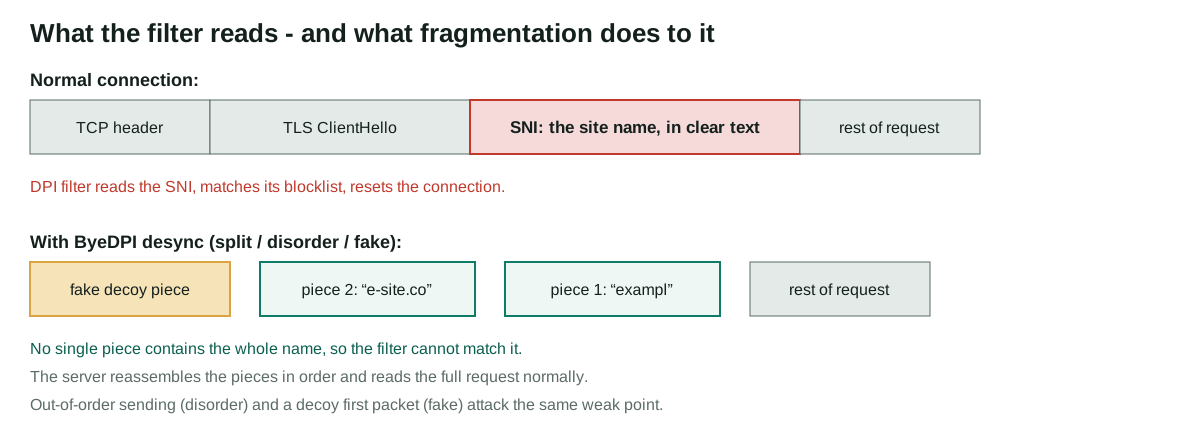
The one field that gives you away: SNI
When your browser opens an HTTPS site, the connection begins with a greeting called a ClientHello. Encryption protects what comes after, but the greeting itself has historically been readable, and it contains a field called SNI — Server Name Indication — which states, in plain text, the name of the site you want. It has to be there: one server IP can host hundreds of sites, and the server needs to know which certificate to present.
That single readable field is all a simple blocking system needs. It does not have to decrypt anything. It reads the SNI, compares it with a list, and either lets the connection continue, resets it, or quietly drops packets until your browser gives up. For plain HTTP the equivalent giveaway is the Host header, which is even easier to read. This is why our guide to how ByeDPI works keeps returning to the same point: almost everything ByeDPI does happens inside, or right next to, the SNI.
Blocking, throttling, and the grey area between
DPI is a technology, not a policy, and providers use it in degrees. Outright blocking is the loudest: the connection is reset the moment a listed name appears. Throttling is quieter and, in our assessment, more common in complaints: the domain is allowed, but traffic identified as belonging to a particular video or messaging service is squeezed until it becomes barely usable. Then there is the grey area — DNS answers quietly replaced, or connections to certain IP ranges made mysteriously unreliable. Same toolkit, different dial setting.
The definition used by the ByeDPI for Android project is refreshingly blunt: DPI is a technology for analysing and filtering traffic, used by providers and government agencies to block sites and services. That is the whole job description. Firewalls also inspect packets, of course — the difference is intent and depth. A basic firewall mostly looks at addresses and ports, the envelope. DPI reads further into the letter.
Why doesn't everyone just use a VPN, then?
A VPN solves a different, larger problem: it tunnels everything to a remote server, encrypts it, and changes your apparent location. That works, but you pay for it in speed, battery, money, or trust — you must trust the VPN operator instead of your provider, and plenty of networks block known VPN traffic with the same DPI equipment. Readers who need location change or real confidentiality should read our honest limits in the ByeDPI review.
Desync tools like ByeDPI are the narrower answer to the narrower problem. If the only thing standing between you and a site is a filter reading your first packets, then scrambling exactly those packets — and sending everything else directly, unencrypted, at full speed — is enough. Nothing leaves your device except the connection you asked for. The trade-off is fragility: a VPN either connects or it doesn't, while a desync method either matches your provider's particular filter or needs adjusting, which is why the settings guide is a ladder rather than a single recommendation.
How to tell if DPI is your problem
Which brings us to the only question that matters before you install anything: is DPI actually your problem? These are the fingerprints it leaves.
- One or two specific sites fail while the rest of the internet works normally on the same connection.
- The same site opens on a different network — a friend's provider, or sometimes mobile data versus home broadband.
- The failure is instant (an immediate reset) or suspiciously timed (a page starts, then dies at the same point every time).
- A video or messaging service technically connects but is too slow to use, while speed tests look healthy.
None of these prove DPI on their own — a broken site looks a lot like a blocked one. The cleanest test remains the on/off test described in the installation guide: if a local desync proxy changes the result, packet inspection was almost certainly involved. If it changes nothing at all, read the third failure case in our troubleshooting guide before spending an evening on settings — the block may be at the IP level, where no desync method can help.
Encrypted ClientHello: is the readable SNI about to disappear?
The obvious question follows: if the readable SNI is the whole problem, why not just encrypt it? That is exactly what Encrypted ClientHello (ECH) sets out to do. With ECH, the sensitive inner greeting — the one carrying the real site name — is encrypted, and the filter sees only an outer greeting naming a public front domain. Where ECH works end to end, the oldest blocking trick in this guide stops working, and honestly, good riddance.
Do not plan around its funeral just yet, though. ECH needs the browser, the server and the site's DNS records to all cooperate, and deployment is still patchy. Some networks answer ECH by blocking it or forcing a fallback to the readable greeting, which lands you exactly where you started. And ECH changes nothing else in this guide: the Host header of plain HTTP is still clear text, DNS lookups are still visible unless separately encrypted, and an IP-level block never needed to read any name at all. That is also why desync is not obsolete. The record-splitting tricks described in how ByeDPI works operate on the greeting itself, outer or inner, and filters that cannot read a name will still fall back on cruder signals that desync was built to dodge. ECH and ByeDPI are answers from different directions to the same flaw — one fixes the protocol for the future, the other works around the network you actually have today.
From the problem to the fix
You know what the filter does now. The natural next read is how ByeDPI's desync methods work in detail — the methods, in the order they are actually applied — followed by the best ByeDPI settings ladder, step by step when you are ready to choose settings. Both live in the ByeDPI guides hub. Haven't installed anything yet? the official ByeDPI download page and the step-by-step ByeDPI installation guide come first, in that order. Small questions go to the ByeDPI FAQ; stubborn problems belong on the ByeDPI support page.
References and sources
Everything factual in this guide traces back to a short list of primary sources. If you read nothing else off-site, read these.
- RFC 8446 — The Transport Layer Security (TLS) Protocol Version 1.3 — defines the ClientHello and the SNI extension this site keeps talking about.
- hufrea/byedpi on GitHub — the ByeDPI core: source, options documentation and releases.
- dovecoteescapee/ByeDPIAndroid on GitHub — the Android app: README, built-in FAQ and releases.